
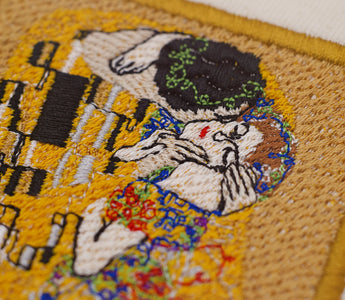
All options at a glance
| Program | On a Mac | What for | Price |
|---|---|---|---|
| Nuime Designer | Native app, Apple silicon | Digitize, check and export your own designs | Free edition at no cost, coming soon; Studio later, price open |
| Ink/Stitch | Inkscape extension | Digitizing, lettering with embroidery fonts | Free, open source |
| Embrilliance | Native app | Editing, lettering; digitizing with StitchArtist | Express free; Essentials $159; StitchArtist $179 to $699 |
| StitchBuddy | Native app (Mac App Store) | View, edit, combine, convert | Free to try; Pro $49.99 |
| Ricoma Chroma | Native app | Automatic and manual digitizing | About $800 incl. first year, then subscription |
| Janome Artistic Digitizer | Mac and Windows | Digitizing, mainly for Janome | Junior from about $400 according to dealers |
| Brother Artspira | iPhone and iPad, no Mac app | Simple designs for wireless Brother machines | App free; Artspira+ subscription |
| Hatch Embroidery | Only through Windows (Parallels) | Editing up to professional digitizing | One-time $199 to $1,199 |
| Wilcom EmbroideryStudio | Only through Windows (Parallels) | Professional digitizing | Subscription, about $790 to $1,490 a year according to dealers |
| BERNINA Embroidery Software 9 | Only through Windows, limited | Digitizing, mainly for BERNINA | Through BERNINA dealers |
| Embird | Only through Windows (Parallels, CrossOver) | Editing, lettering, digitizing in modules | Base program $149, modules extra |
| Brother PE-Design 11 | Only through Windows | Digitizing and lettering for Brother | About $1,500 to $2,000 according to dealers |
As of 16 October 2026. Prices are regular prices from the makers in US dollars, without promotions; dealer figures are marked as such. Prices and system requirements change, so check them before you buy.
Most well-known embroidery programs are built for Windows. On a Mac you still have good options, free and paid. Which one fits depends mainly on what you want to do: view and convert existing files, combine lettering and designs, or digitize your own designs. Below you'll find, for each program, what it can do, who it's worth it for, where its limits are and how to try it.
The short version
- View, adjust and convert existing embroidery files: StitchBuddy (free to try) or Embrilliance Essentials.
- Combine names, monograms and designs: Embrilliance Essentials, a native Mac app.
- Digitize your own designs for free: Ink/Stitch, an extension for Inkscape. Once released, also Nuime Designer Free as a standalone Mac app.
- Digitize with paid Mac software: Embrilliance StitchArtist, Ricoma Chroma or Janome Artistic Digitizer.
- Wireless Brother machine and an iPad: Brother Artspira.
- Professional tools like Hatch or Wilcom: only through Windows on your Mac, with Parallels, plenty of memory and limited support.
First decide: view, edit or digitize?
A viewer shows the size, colours and stitch count of an existing file. An editor can rotate, resize, combine and recolour existing stitches and save them in another format. When you digitize, you create shapes and choose stitch type, direction, density, underlay and pull compensation, which produces a new stitch plan. If you only want to get shop designs onto a USB stick, you don't need digitizing software. If you want to stitch your own logos or drawings, you do.
| Task | What you need | Important limit |
|---|---|---|
| View and convert files | A program that reads and writes your formats | The preview tells you nothing about how well the file stitches on your fabric. |
| Edit existing stitches | Rotate, resize, combine, recolour, reorder | PES or DST files don't turn back into editable shapes; heavy resizing changes the density. |
| Add lettering | Ready-made embroidery fonts or font conversion | Converted computer fonts often need touch-ups. |
| Digitize your own designs | Shape tools, running stitch, satin, tatami and settings | Even automatic conversion needs review and a test stitch-out. |
Free, one-time purchase or subscription
The pricing models differ a lot. Free: Ink/Stitch, Embrilliance Express, the Brother Artspira app and, once available, Nuime Designer Free. One-time purchase: Embrilliance, StitchBuddy Pro, Hatch, Embird and PE-Design; Hatch and Embrilliance also sell paid upgrades between levels. Subscription: Ricoma Chroma (after the first year), Artspira+ and usually Wilcom EmbroideryStudio. For Windows programs on a Mac, add Parallels and a Windows licence.
Native Mac programs
These programs run directly on macOS, without Windows.
Nuime Designer: digitize your own designs, free and native on the Mac
On a Mac: Standalone app for Macs with Apple silicon; the macOS version is listed with the download
Price: Free edition permanently free, including commercial use and without an export limit; Studio later, price open
Try it: Free is coming soon; you can sign up for a notification on the product page
Who it's for: Anyone who wants to digitize their own designs on a Mac and check them closely before stitching
Nuime Designer is a standalone Mac app with its own stitch engine, without Windows, without a graphics program in the background and without an account. You draw outlines, fills and satin columns, or import SVG artwork and trace a reference image. For each shape you choose the stitch type (running stitch, satin, tatami), density, direction, underlay and pull compensation. Satin columns get wider or narrower with their shape.
Before exporting, you see the calculated stitches in a realistic preview with light and shadow and follow the simulation stitch by stitch. Density and direction views plus technical checks point out problem spots. It saves to eight machine formats: PES, DST, JEF, VP3, EXP, XXX, U01 and TBF, straight to a USB stick if you like, with a production sheet that estimates thread use. You also save projects as .nuime files so they stay editable. The library organizes your embroidery files with search, tags and collections. Everything is calculated locally on your Mac.
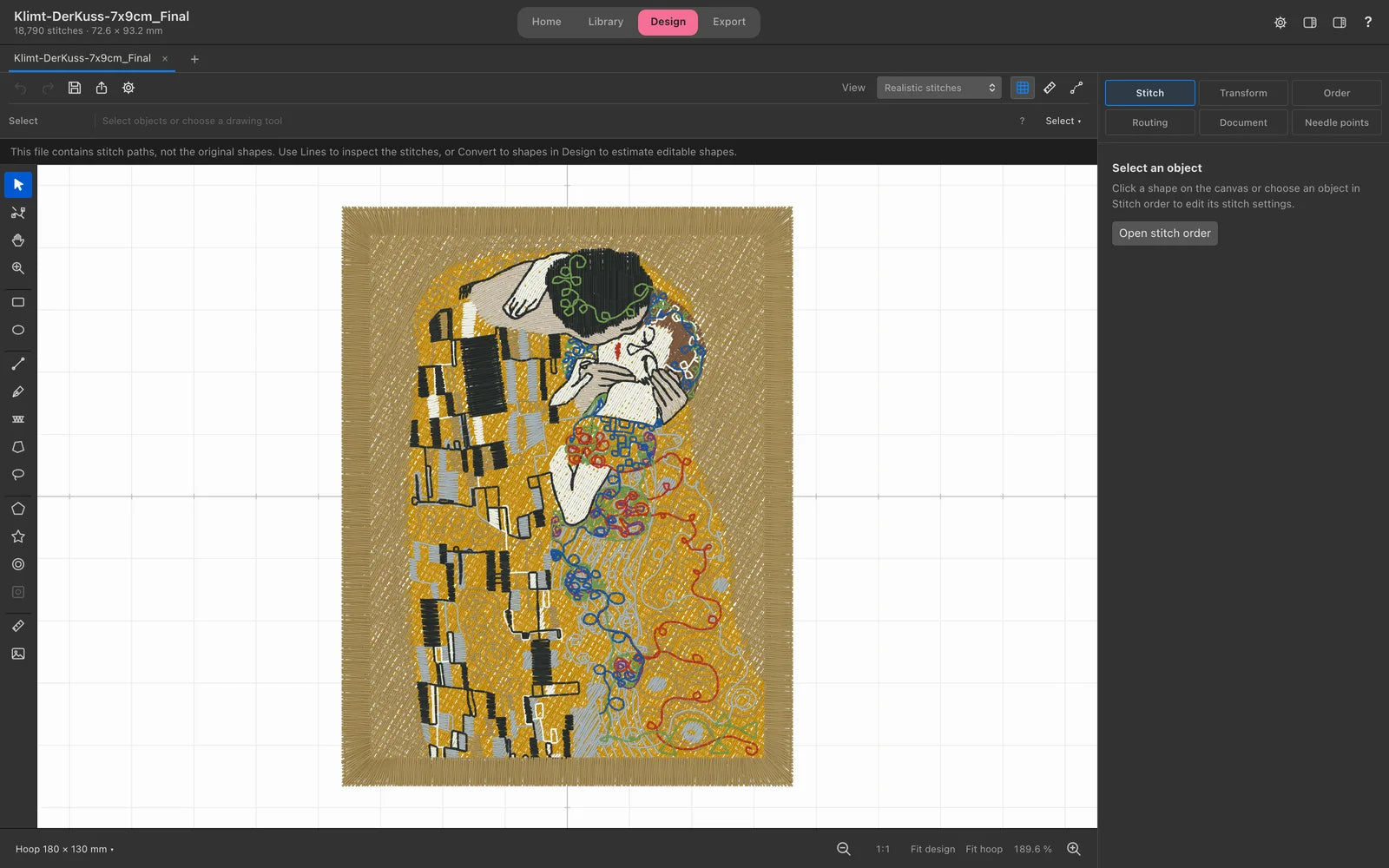
A good fit if you want to create your own designs without learning a graphics program with an extension or installing Windows, and a close preview before the first stitch matters to you.
Limits, honestly: The Free edition isn't released yet. It only runs on Macs with Apple silicon, not on Intel Macs. Lettering with ready-made embroidery fonts is planned for Free but not included yet. Studio, with lettering from installed fonts, special fills, image conversion, appliqué, name lists and Photo Studio, is in development; price and date aren't set. Material profiles are starting values, not a replacement for a test stitch-out on your fabric.

Transparency: Nuime Designer is my own program; I develop it myself. That's why it comes first in this overview. I have still described the other programs the way I would have wanted them compared, with strengths and limits.
Every Free and Studio feature, plus the launch notification, is on the Nuime Designer page →
Ink/Stitch: the free professional toolkit for Inkscape
On a Mac: Inkscape extension for Apple silicon and Intel from macOS 12; current version 3.3.0 (July 2026)
Price: Free, open source (GPL-3.0)
Try it: Just install it: first Inkscape, then Ink/Stitch
Who it's for: Budget-minded makers, tinkerers and anyone who knows or wants to learn Inkscape
Ink/Stitch turns the free vector program Inkscape into digitizing software. You draw your design as vector artwork and decide for each path whether it becomes running stitch, a satin column or a fill; all settings live in a dialog. Ink/Stitch includes a simulation and many embroidery fonts for text, and it saves to numerous machine formats, including PES, DST, JEF and EXP.
The project is actively developed. Version 3.2, for example, added right-to-left lettering and batch lettering, which turns one design into many files with different names. Version 3.3 adds cross stitch fills and more lettering spacing options, and makes it easier to create even-width satin columns straight from lines.
A good fit if you don't want to spend money and are willing to learn. The feature set goes a long way, and there is detailed documentation and an active community.
Limits: You work in two worlds: design in Inkscape, stitch settings in extension dialogs. That's powerful but less direct than a standalone embroidery program. Inkscape has to be installed and launched once beforehand; on Apple silicon Macs the guide also recommends Rosetta. Problems are solved through the forum and documentation, not vendor support.
Getting started: Follow the official macOS install guide and begin with a simple design made of a few shapes. The included examples show how satin columns are built.
Embrilliance: combine lettering and designs, native on the Mac
On a Mac: Native app for macOS and Windows, current installers up to macOS Tahoe
Price: Express free; Essentials $159; StitchArtist Level 1/2/3: $179/$389/$699; Thumbnailer $44.95
Try it: The free Express mode shows you the interface
Who it's for: Anyone who mainly personalizes, combines and letters existing designs
Embrilliance is a family of programs that share one interface and run natively on Mac and Windows. You buy individual modules and unlock them in the same program.
- Express (free): type text with BX fonts and save Embrilliance files to machine formats.
- Essentials: open and combine designs in almost any format, even straight from ZIP files, resize with stitch recalculation (about 50 to 250%), recolour, add lettering with built-in fonts, monograms and circle text, and import BX fonts.
- StitchArtist for digitizing in three levels: Level 1 for running stitch, satin, fills, appliqué, redwork and freestanding lace; Levels 2 and 3 add more tools and effects. Upgrades between levels are available.
- Thumbnailer: shows previews of embroidery files right in the Finder, handy for large collections.
A good fit if you combine names, monograms and purchased designs and want a well-established Mac app. You buy once, with no subscription.
Limits: The modules add up. If you're serious about digitizing, you need Essentials plus a higher StitchArtist level, which costs several hundred dollars.
Getting started: Download Embrilliance and try Express. Essentials is usually enough for combining existing designs; only add StitchArtist once you really want to digitize yourself.
StitchBuddy: view, adjust and convert embroidery files
On a Mac: Native Mac App Store app, from macOS 12
Price: Free with a limit; StitchBuddy Pro $49.99 (in-app purchase)
Try it: All features free, saving up to 1,000 stitches
Who it's for: Anyone who wants to check, adjust and convert purchased files for their machine
StitchBuddy is a lean editor for existing embroidery files. You can rotate, flip, move and resize designs, copy and paste parts, center them in the hoop, swap colours individually or as a whole palette, reorder threads and add basting stitches. Simple outline and fill shapes can be created from macOS fonts or SVG paths. You can print actual-size templates for placement on fabric.
It reads Janome JEF, JEF+, JPX and SEW, Brother PES and PEC, Melco EXP, Bernina EXP+, Tajima DST and Pfaff VP3, KSM, PCS, PCQ and PCD. It writes JEF, PES (version 1) and PEC, EXP, EXP+, DST and PCS.
A good fit if you mainly work with purchased designs and want an affordable, quick Mac app.
Limits: The free version only saves designs up to 1,000 stitches, and most designs are larger. StitchBuddy reads VP3 but can't write it. It isn't meant for digitizing your own designs.
Ricoma Chroma: automatic digitizing on the Mac, by subscription
On a Mac: Native app, from macOS Mojave, Big Sur or later recommended
Price: About $800 for the first twelve months, then a monthly or yearly subscription
Try it: Unlimited trial of Chroma Luxe for Mac and PC, no credit card
Who it's for: Anyone who digitizes orders regularly and wants a Mac app with automation
Chroma comes from machine maker Ricoma but works with machines from other brands. There are three levels: Inspire with the basics (import designs, edit shapes, change thread colours, auto-digitize), Plus with more editing tools and fills, and Luxe with extras such as a font editor, pattern creator and design database.
Chroma automatically converts vector artwork, PNG and JPEG into embroidery files; for manual digitizing you choose stitch type, density, direction and underlay yourself. It also offers about 250 ready-made fonts, a realistic view and 3D previews on products. It exports to DST, PES, JEF and VP3, among others.
A good fit if you want to turn many designs around quickly, for example customer orders, and factor the subscription into your pricing.
Limits: The subscription is expensive for occasional embroiderers. Automatically generated stitches still need review and often touch-ups.
Janome Artistic Digitizer: digitizing for Janome owners
On a Mac: One package for Mac and Windows
Price: Through dealers; Junior from about $400 according to dealers, full version considerably more
Try it: Ask your dealer
Who it's for: Janome owners who want a maker's program with dealer support
Janome offers the Artistic Digitizer in two versions. Junior is a reduced entry version with 21 ready-made fonts. According to a dealer comparison, the full version adds about 256 fonts, photo stitch, cross stitch, rhinestone tools, quilt and cutter export and wireless transfer to compatible machines, among other things. Junior can be upgraded later.
A good fit if you own a Janome machine and value advice from a dealer.
Limits: Prices are only available through dealers and vary by country. If you own another brand, check the export formats and current macOS support first.
Brother Artspira: designs from your iPad straight to the machine
On a Mac: No Mac app; for iPhone, iPad and Android
Price: App free; Artspira+ subscription, $12.99 a month at launch in 2023, yearly plan available
Try it: Artspira+ free for one month (payment details required)
Who it's for: Owners of wireless Brother machines who create simple designs on the go
Artspira is Brother's app for embroidery and cutting machines. You create simple designs, use templates and send them over Wi-Fi to compatible Brother machines. Artspira+ adds auto-digitizing, portrait conversion and drawing tools for embroidery, among other features.
A good fit if you own a compatible Brother machine and want to create a small design quickly on your iPad.
Limits: Not full Mac software, tied to Brother machines, and the more interesting features require a subscription.
Windows programs on a Mac
Many well-known embroidery programs only exist for Windows. On an Apple silicon Mac they run through Parallels Desktop with Windows 11 for ARM, and on older Intel Macs partly through Boot Camp. Expect extra costs for Parallels and a Windows licence, plenty of memory (Wilcom names at least 32 GB), and makers that often support Mac use only partly or not at all. Trial versions only run on Windows.
Hatch Embroidery: from organizing to professional digitizing
On a Mac: Windows only; through Parallels with Windows 11 ARM, not an officially supported configuration according to the Hatch FAQ
Price: One-time: Organizer $199, Composer $699, Digitizer $1,199; instalments available
Try it: 30 days free, but according to Hatch not for Mac, not even in Parallels
Who it's for: Anyone who needs Hatch's tools and accepts Windows on their Mac
Hatch Embroidery comes from Wilcom and targets hobbyists and small businesses. There are four levels: Organizer for managing, resizing, recolouring and converting, Personalizer with fonts and monograms, Composer with auto-digitizing and object editing, and Digitizer with full manual control. You buy once, with no subscription.
A good fit if you already own a Hatch licence, take courses based on it or need exactly these tools.
Limits: No Mac support, no Mac trial, and according to Hatch, version 4 may currently run slower on Apple silicon. Hatch also recommends plenty of memory.
Wilcom EmbroideryStudio: the industry standard
On a Mac: Windows only; versions 2025 and 2026 supported through Parallels with Windows 11 ARM, but not native; at least 32 GB of memory
Price: Subscription, about $790 (Decorating) to $1,490 (Designing) a year according to dealers; perpetual licences through dealers
Try it: 14 days free, all levels, Windows only
Who it's for: Professional digitizers and embroidery businesses
EmbroideryStudio is the professional tool of many digitizers and embroidery shops. Version 2026 comes in four levels: Lettering for automatic lettering, Editing for changes to monograms and lettering, Decorating for professional embroidery and other decoration, and Designing as the complete package. Some features are only available with a subscription, not with a perpetual licence.
A good fit if you digitize professionally, work with industrial machines or exchange files with businesses that use Wilcom.
Limits: Expensive, only works on a Mac with powerful hardware and Parallels, and Wilcom doesn't help with setting up Parallels or Windows.
BERNINA Embroidery Software 9: for BERNINA owners
On a Mac: Windows only; Intel Macs through Boot Camp, Apple silicon through Parallels with limited support
Price: Through BERNINA dealers
Try it: 30 days free with all features, on Windows
Who it's for: BERNINA owners who want to stay with the maker
BERNINA's software comes as Creator and the more extensive DesignerPlus; Creator can be upgraded later. It offers digitizing, lettering and editing and works closely with BERNINA machines.
A good fit if you own a BERNINA and use advice and classes from your dealer.
Limits: Only limited support on Apple silicon Macs, and prices are only available from dealers.
Embird: modular and affordable, but Windows only
On a Mac: Windows only; guides for Parallels, Wine and CrossOver, with no support from the Embird team for CrossOver
Price: Base program $149; modules such as Font Engine ($145) and the Studio NEXT digitizing module extra
Try it: 30 days or 100 launches, without saving finished designs
Who it's for: Budget-minded Windows users who add features piece by piece
Embird has been a modular embroidery program for many years: the base program manages, edits and converts embroidery files, and modules add lettering and digitizing. The new Studio NEXT digitizing module requires Windows 10 or 11.
A good fit if you already have a Windows PC or a working Windows setup and want an affordable start.
Limits: The interface is fairly technical, and on a Mac Embird only runs through workarounds without guarantees.
Brother PE-Design 11: Brother's big digitizing program
On a Mac: Windows only
Price: About $1,500 to $2,000 according to dealers; be careful with very cheap "licences" from unknown sources
Try it: Trial version from Brother, for Windows
Who it's for: Brother owners who want a comprehensive maker's program
PE-Design 11 includes 130 fonts, over 1,000 built-in designs, photo stitch, wizards for auto punch and cross stitch, and a colour sort that stitches shared colour areas together. With Stitch Design Factory you create your own decorative stitches. According to Brother, wireless transfer only works with certain machines.
A good fit if you own a Brother machine, already use Windows and value lots of ready-made content.
Limits: Expensive, Windows only, and dealer prices vary widely.
How to find the right program
- Decide what you want to do. View and convert, add lettering or digitize? That alone saves a lot of money.
- Test with your own file. Open a design, check size and colour order, save it in your machine's format and stitch a small test piece.
- Check the formats. Can the program write exactly the format your machine reads? A maker's list doesn't replace a test with your model.
- Add up the total cost. Modules, upgrades, subscriptions, Parallels and a Windows licence often come on top.
- Plan for editability. A machine file contains stitches, not shapes. When you digitize, always save the program's project file too.
- Don't expect miracles from automation. Automatically generated stitches are a starting point. Good results need review and touch-ups.
Frequently asked questions
Is there free embroidery software for Mac?
Yes. For digitizing there is Ink/Stitch, a free extension for Inkscape; Nuime Designer Free is coming soon as a standalone Mac app. Embrilliance Express types text with BX fonts for free, and you can try StitchBuddy for free, although saving is limited to 1,000 stitches.
Can I open PES files on a Mac?
Yes, for example with StitchBuddy, Embrilliance, Ink/Stitch or Nuime Designer. Afterwards, check size, colour order and stitch count.
Do Hatch or Wilcom run on a Mac?
Not natively. Both run through Parallels with Windows 11 for ARM. Wilcom supports this for EmbroideryStudio 2025 and 2026 with at least 32 GB of memory; according to the Hatch FAQ, it isn't an officially supported configuration for Hatch.
What do I need as a beginner?
If you stitch purchased designs, an editor like StitchBuddy or Embrilliance Essentials is enough. If you want to digitize your own designs, start for free with Ink/Stitch or, once available, Nuime Designer Free, and only invest once you know what you're missing.
Is a subscription worth it?
For regular orders it can be, because updates are included. For hobby projects, free programs or a one-time purchase are usually cheaper.
I explain step by step how a graphic becomes an embroidery file in creating an embroidery file from an image. New to machine embroidery? Start with the beginner guide.




![Personalisiertes Unisex-T-Shirt mit gesticktem japanischen Wunschtext, erhältlich in 7 Farben, Classic und Oversized Fit [MOT]](http://keomakindl.com/cdn/shop/files/custom-tshirt-embroidery-your-text-japanese-colors.webp?crop=center&height=350&v=1776698323&width=298)
![Personalisiertes T-Shirt in Weiß mit japanischem gesticktem Text – Detailaufnahme der Stickerei [MOT]](http://keomakindl.com/cdn/shop/files/tshirt-overview-personalized-custom-japanese-text-detail.webp?crop=center&height=350&v=1776698323&width=298)


![Personalisiertes Unisex-T-Shirt mit gesticktem Wunschtext, erhältlich in 7 Farben, Classic und Oversized Fit [MOT]](http://keomakindl.com/cdn/shop/files/custom-tshirt-embroidery-your-text-colors.webp?crop=center&height=350&v=1776698282&width=298)
![Personalisiertes weißes T-Shirt mit deinem bestickten Text – Detailaufnahme der Stickerei [MOT]](http://keomakindl.com/cdn/shop/files/custom-tshirt-embroidery-your-text-detail.webp?crop=center&height=350&v=1776698282&width=298)


